







WhatsApp Messenger review
 Analysis by GetAllApps
I use WhatsApp Messenger as the place where everyday conversations turn into practical plans: a quick note to family, a photo for a colleague, or a group chat that keeps everyone aligned. Its strength is not that it tries to be everything; it is that many people already know how to reach me there. That familiarity makes it an easy default, though it also means the app can become noisy if I do not set it up with a little care.
How the everyday workflow holds together
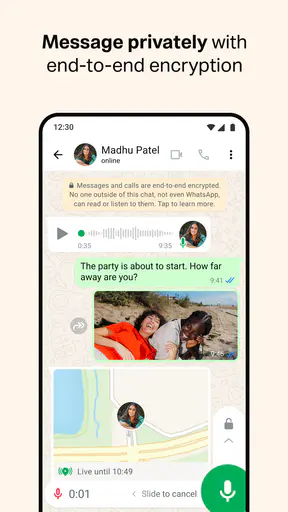
As a communication app from WhatsApp LLC, WhatsApp keeps its main job straightforward: conversations are organized around people and groups, with messaging, voice and video calls, and media sharing close at hand. I can move from a short text to a call without asking someone to install a separate tool, which is useful when plans change faster than a carefully written email thread can keep up.
A realistic example is coordinating a family visit. I can ask who is bringing food in the group, send the address privately to a relative, and call someone who is running late. The useful part is the continuity: people can respond in the format that suits them, while the conversation stays easy to find later. I still try to keep decisions clear—one message with the final time and place is better than expecting everyone to reconstruct them from a long chat.
For a one-to-one exchange, the app feels light enough for quick questions but capable of carrying a longer conversation. Photos, documents, voice messages, and calls make it more flexible than SMS, especially when a group includes people in different places. I find voice messages handy when typing would be awkward, but they are less considerate when the recipient is busy or somewhere quiet text is easier to check. A short written summary after a long voice note can save everyone time.
The app’s reach is part of its practical appeal. It has passed 10 billion installs, and its 4.6 average rating reflects a very large audience’s experience. Those figures do not guarantee that every contact uses it, but in many social circles it is already the shared option. If your friends, relatives, or customers are elsewhere, the network effect matters more than any feature list: the best messenger is often the one the people you need will actually open.
Small habits that make chats easier to manage
I recommend treating group chats as shared spaces rather than dumping grounds. Give a group a clear name and image, keep its purpose narrow, and use replies when answering a particular message. That last habit is especially helpful when several topics are moving at once; it lets someone see which question an answer belongs to without asking the whole group to scroll and guess.
Search is more useful when I remember a distinctive word, person, or attachment rather than trying to reread a whole conversation. If I know a practical detail will matter later, I send it in a clear message—“Friday, 6 p.m., front entrance”—instead of burying it in a string of reactions. This is not glamorous, but it turns a chat into a usable record. For recurring plans, I also avoid relying on an old message as if it were a calendar reminder; copying the final detail into the tool I use for scheduling is safer.
Another good habit is to separate audiences. A private chat is better for personal details, while a group works for information everyone needs. That sounds obvious, but the speed of messaging makes it easy to send something to the wrong conversation. Before sharing a sensitive photo or a message about another person, I check the chat header and recipients. The extra second is worth it.
Settings I would check before settling in
Privacy and notification controls deserve attention early, not only after a chat becomes distracting. I would review who can see personal profile details and adjust the available privacy choices to match how I use the app. The right balance differs: someone using WhatsApp mainly with close family may want a different level of visibility from someone whose number is shared with customers or community groups.
Notifications are another place where a little setup pays off. Muting a busy group can preserve the conversation without letting every new message interrupt the day. I would keep alerts for people whose calls or messages are genuinely time-sensitive, then silence groups that are useful to check on my own schedule. Muting is not the same as leaving: it is a practical middle ground when I want the information but not the constant interruption.
I also suggest checking how media is handled and what gets saved to the device, particularly if friends regularly share videos and photos. Automatic saving can make important images easy to find, but it can also clutter a personal gallery with every forwarded picture. Choosing a deliberate approach—saving what I need instead of treating every attachment as permanent—keeps both the gallery and the chat experience more manageable.
For anyone concerned about account access, I would look through the account and security settings and enable the protections available there. I would also be careful with verification codes: a request for one should never be treated as ordinary conversation. A trusted contact can still make a mistake or have an account taken over, so unusual requests for money or codes deserve confirmation through another channel. These are sensible habits for a messaging app, not a reason to assume every message is suspicious.
Faster patterns for people who use it all day
Experienced users get more value from repeatable routines than from trying to answer everything instantly. I check chats in batches, reply to the messages that need a decision, and leave low-priority conversation for a quieter moment. When a message contains several questions, I answer them together and make the next step explicit. That cuts down on the familiar back-and-forth where everyone thinks someone else is handling the plan.
On a phone, I use the operating system’s available sharing and notification shortcuts where they make sense, but I keep the final check inside the conversation. A quick reply is convenient; sending the wrong attachment or responding to the wrong group is not. If I am sharing a document, I confirm the recipient and filename first. This small pause is particularly useful when work and personal chats sit side by side.
Voice and video calls are most useful when typing would create more friction than talking. I switch to a call for a complicated explanation, a quick check-in, or a situation where tone matters; I stick with text when the recipient may be unavailable or needs a record they can revisit. For group coordination, I try to post a concise written conclusion after a call. Not everyone can join, and a clear follow-up prevents the same discussion from restarting.
WhatsApp can also support a simple customer or community workflow, provided expectations are clear. A small seller might use it to answer questions and confirm arrangements, while a club could use a group to share updates. I would not turn one large group into a substitute for a proper support desk: conversations can overlap, ownership can become unclear, and people may not want their number exposed to a broad audience. Keep the audience appropriate and move sensitive exchanges to a private chat.
Where convenience has limits
The same openness that makes the app easy to join can make it hard to keep quiet. Group invitations, forwarded material, and frequent reactions can fill the chat list with conversations that are not important to me. Muting, leaving groups that no longer serve a purpose, and checking notification settings help, but they require maintenance. If someone wants a messenger that stays deliberately minimal without ongoing housekeeping, WhatsApp may feel busier than expected.
It is also not a replacement for every communication tool. Email is often better for formal messages that need a subject, a clear paper trail, or a structured exchange with people who do not share a phone-based chat. A workplace platform may be preferable when an organization needs managed channels, formal task tracking, or separation between work and personal life. WhatsApp is strongest when people need to reach one another quickly; it is less suited to imposing a disciplined system on a large team.
Compared with ordinary SMS, it can make sharing rich media and holding group conversations more convenient, but both sides need access to the service and a working connection. Compared with other internet messaging apps, the deciding factor is often where a person’s contacts already are, rather than a universal technical winner. If your circle prefers another platform, asking everyone to switch just for one conversation may create more friction than benefit.
Privacy-minded users should still think before posting. A private conversation is not a guarantee that a recipient will handle a message carefully, and a chat history can contain personal information worth managing thoughtfully. I avoid sending details I would not want forwarded, use the app’s controls to shape visibility, and keep important records somewhere appropriate rather than assuming a messaging thread is a permanent archive. This is a practical approach to any everyday messenger.
Who I would recommend it to
WhatsApp Messenger is a sensible choice if the people you speak with already use it and you want one familiar place for texts, calls, groups, and shared media. It is especially convenient for families, friends, small communities, and people who coordinate plans across distances. It is free to download and use, carries an Everyone age rating, and has been available since October 18, 2010. Its current version is 2.26.41.77; in-app purchases are listed from $0.40 to $199.99 per item.
I would hesitate to recommend it as the only channel for someone who needs formal records, strong workplace organization, or a quiet inbox without active notification management. I would also choose another service when a person’s important contacts are already concentrated there. The app’s huge audience—around 246 million ratings and 1.9 million written reviews—helps explain its broad familiarity, but it does not make it the right fit for every group or communication style.
A practical verdict after making it part of a routine
What I appreciate most is how little effort it takes to move from a message to a useful next step. What I like less is that convenience can encourage constant checking and sprawling group threads. I get the best results by muting low-priority chats, keeping group purposes clear, using calls when text becomes cumbersome, and writing down decisions in a way people can find later.
If your circle is already there, I would recommend giving it a try and spending a few minutes on privacy, notifications, and media habits before the chats pile up. If you need a structured workspace or your contacts favor another messenger, choose the tool that fits that reality instead. WhatsApp is at its best as a dependable everyday meeting point—not as a substitute for every system, boundary, or conversation that life requires.
Pros and cons
Pros
- End-to-end encryption protects personal chats and calls.
- Voice and video calls work across Android and iOS.
- Group chats make it easy to stay in touch.
- Messages can be edited shortly after sending.
- Linked devices let you use WhatsApp on a computer.
Cons
- A phone number is required to create an account.
- Backups may not be end-to-end encrypted by default.
- Large groups can generate frequent notifications.
- Some features depend on a stable internet connection.
- Business messages and channels can add promotional content.


